Building a Linux Workstation for Azure and Entra ID Pentesting
Most people meet Azure security through the portal. You click around, read some role assignments, maybe run a few az commands, and it can feel like the whole job lives in a browser tab. It doesn’t. The minute you move past clicking and start dealing with tokens, Graph calls, refresh flows, and scripted enumeration, you want a real workstation behind you.
I came to cloud security from the on-prem side, where my comfort zone was Active Directory and network attacks. Standing up a proper Linux box for Azure and Entra work turned out to be one of the better moves I made in that transition, and not really for the reasons people usually list. So let me explain the reasons that actually held up, and then walk through what goes on the machine.
One thing first: this is not Linux versus Microsoft tooling. Half of what I run on this box is Microsoft’s own PowerShell modules. Linux is the base I drive everything from, not a replacement for any of it.
Why Linux earns its place
This one took me a while to appreciate. A lot of the tenant-side Entra and Azure work you care about is an API conversation. You authenticate, you get tokens, and from there much of the job is HTTPS against Microsoft Graph, Azure Resource Manager, and the login endpoints. Once you hold a usable token, the operating system underneath you often matters less than the token’s audience, permissions, claims, and binding.
That flips the question. The interesting work isn’t “what runs on Windows,” it’s “what gives me the cleanest place to script API calls, parse JSON, juggle tokens, and automate the boring parts.” For me that is a Linux box, almost every time.
The practical wins stack up quickly. Python tooling installs without a fight. JSON in, JSON out, and jq makes it bearable. Containers and throwaway VMs are trivial, so I can burn an environment and rebuild it without thinking. And it stays cleanly separated from the machine I read email on, which matters more than people admit when you are handling live tokens for someone else’s tenant.
None of that is exotic. It’s just less friction, and friction is what kills good habits.
The base system
I am keeping this deliberately vague on which distribution to use, because honestly it matters far less than the internet wants you to believe. Pick something mainstream and well supported, keep it patched, and move on. A dedicated VM is the sensible default. A spare laptop works if you have one lying around. If you live in Windows day to day, a WSL setup gets you most of the way for API-driven work, but I would not treat it as the same isolation boundary as a dedicated VM.
The plumbing
Before any security tooling, get the boring foundation right, because everything else leans on it. You want git, curl, and jq. You want Python with a sane way to install command-line tools in isolation, which for me is pipx so each tool gets its own environment and nothing collides. You want Docker for the things that are easier to run in a container than to install natively. An editor you actually like. And the usual networking utilities for when you need to see what is going over the wire.
sudo apt update
sudo apt install -y git curl jq python3-pip pipx docker.io
pipx ensurepath
Spend ten minutes here and you save yourself a hundred small annoyances later.
You don’t give up PowerShell
This is the objection I hear most, so let me kill it early. Moving to Linux doesn’t mean abandoning the Microsoft modules. PowerShell 7 is cross-platform, and once it’s installed the modules I rely on come along without complaint:
Install-Module Az -Scope CurrentUser
Install-Module Microsoft.Graph -Scope CurrentUser
Install-Module Microsoft.Entra -Scope CurrentUser
The Az module, the Microsoft Graph SDK, and the Microsoft Entra module all run fine on Linux. The Azure CLI sits alongside them for the times a quick az one-liner beats a cmdlet. So the split is simple: Linux is the host and the scripting environment, and Microsoft’s supported tooling runs on top of it. Third-party PowerShell scripts are a different story, so test those individually rather than assuming PowerShell 7 makes them cross-platform.
Looking inside tokens
If there is one skill that separates people who understand Entra from people who memorise commands, it’s reading tokens. A huge amount of this work is “what is actually in this access token, what audience is it for, what delegated scopes or application roles does it carry, who issued it, and can I trade it for something more useful.”
So you want fast ways to decode a JWT and see what’s inside it. On the box, roadtx and jwt_tool both pull a token apart from the command line:
# Decode a token you already captured
roadtx describe -t "<access-token>"
# or
python3 jwt_tool.py "<access-token>"
What you are looking for is the handful of claims that decide what the token can actually do:
{
  "aud": "https://graph.microsoft.com",
  "iss": "https://sts.windows.net/<tenant-id>/",
  "appid": "<client-id>",
  "scp": "User.Read Directory.Read.All",
  "roles": ["Application.ReadWrite.All"],
  "exp": 1749650400
}
For a quick glance at synthetic or lab tokens, there is jwt.io or Microsoft’s jwt.ms; Microsoft documents that jwt.ms performs the decoding in the browser. For live engagement tokens, stick to local decoding unless the rules of engagement explicitly allow a browser tool.
Beyond that, you want to be able to hit Graph directly and read the raw response, and you want to watch OAuth and OIDC flows as they happen. An intercepting proxy is the tool here — Burp is the de facto standard — and the browser developer tools cover the rest when you are chasing a sign-in flow by hand. Most of the genuinely interesting findings I’ve had started with noticing something odd in a token or a redirect, not with a tool spitting out “VULNERABLE.”
The offensive set
Now the tooling people actually came for. I find it more useful to group these by what they are built on, because that is what tells you how comfortably they sit on a Linux box.
The Python, Go, and .NET tools are the native backbone:
| Tool | Built on | Native on Linux | What it’s for |
|---|---|---|---|
ROADtools (roadrecon, roadtx) |
Python | Yes | Directory dump into a local DB, plus auth flows and token exchange |
| AzureHound | Go | Yes (single binary) | Collector that feeds the BloodHound attack-path graph |
| GraphSpy | Python | Yes | Device-code work and token management with a browser UI |
| TeamFiltration | .NET | Yes (cross-platform) | Enumeration, spraying, and exfiltration across the Microsoft cloud |
ROADtools is the one I reach for first. Install and first run look like this:
pipx install roadrecon
pipx install roadtx

# authenticate, pull the directory into a local DB, then browse it
roadrecon auth -u user@victim.onmicrosoft.com
roadrecon gather
roadrecon gui      # http://127.0.0.1:5000
AzureHound is a single Go binary; point it at the tenant and hand the JSON to BloodHound:
azurehound -u user@victim.onmicrosoft.com \
  list --tenant victim.onmicrosoft.com -o azurehound.json
The PowerShell tools need individual treatment. PowerShell 7 itself is cross-platform, but a script can still depend on Windows-only modules or APIs:
| Tool | On Linux PS7 | Note |
|---|---|---|
| GraphRunner | Yes | Post-authentication work against Microsoft Graph |
| MicroBurst | No | Keep on the Windows VM; upstream README still marks it Windows-only |
| MFASweep | Test first | Noisy by design: 11–12 auth attempts per account, so plan for lockout and detection |
| TokenTacticsV2 | Yes | Token manipulation and refresh flows; use the v2 line, not the original |
Initial access has moved. Microsoft now enforces MFA for the admin portals and is gradually enforcing it for Azure management create, update, and delete operations through Azure CLI, Azure PowerShell, SDKs, and ARM REST. Read-only ARM operations are outside that Phase 2 requirement, and workload identities are not affected. ROPC is not universally disabled, but it cannot satisfy an MFA challenge, so it fails wherever the sign-in must meet MFA. Plain credential spraying is therefore more tenant- and resource-specific than it used to be. Device-code and adversary-in-the-middle tooling still deserve a place on the box, but not because password-based paths have disappeared.
When the engagement is hybrid
Plenty of real targets are not pure cloud. They are an on-prem estate stitched to a tenant, and the interesting paths run across that seam. For those I keep the on-prem kit on the same machine:
| Tool | Purpose |
|---|---|
| Impacket | Network and authentication primitives |
| NetExec | The same work, at scale across hosts |
| Certipy | AD CS enumeration and abuse |
| BloodHound CE | One graph for both the on-prem data and the Azure data from AzureHound |
| Wireshark | When a capture answers a question faster than any tool |
The point of having both sets in one place is that hybrid attack paths do not respect the boundary, so neither should your workstation.
There is a quieter advantage too. This is the same Linux environment I already run classical network and AD pentests from, so the muscle memory carries straight over: same shell, same tmux, same Impacket and NetExec habits I have leaned on for years. Crossing from the on-prem half of an engagement to the cloud half doesn’t mean switching toolsets or context — the Azure and Entra work just rides on top of reflexes that are already automatic.
What this box can’t do
Time for the honest part, because the tool lists never mention it. A Linux workstation runs most of the Entra kill chain comfortably, but there is a slice that is genuinely Windows territory, and it is worth knowing exactly where the wall is.
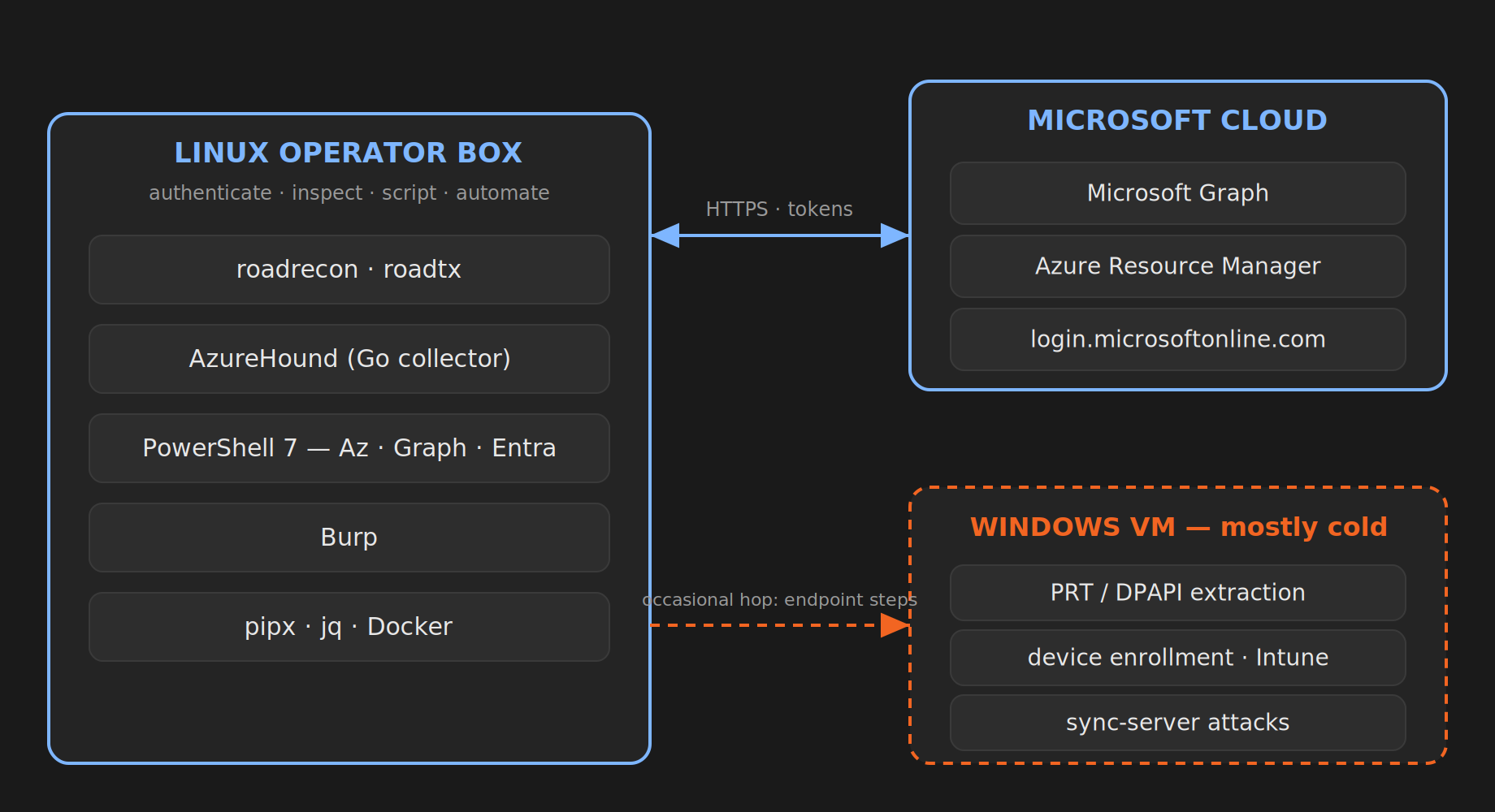
Anything that requires local access to Windows identity material needs execution in a Windows context, even if you orchestrate the work from Linux. That includes extracting a Primary Refresh Token and its session key from WAM or TokenBroker, decrypting DPAPI-protected secrets on the endpoint, and many device-enrolment or Intune workflows. Sync-server attacks also target a Windows system, although the operator can still drive parts of the engagement remotely. To be precise about one common confusion: roadtx can use a Primary Refresh Token and its session key, and can request a new PRT when you already control suitable user and device credentials. Stealing an existing PRT from a live Windows machine is the Windows-side step.
So here’s the model I landed on. Linux is the operator box where the API-driven work, the scripting, and the analysis live. A disposable Windows VM is on standby for the endpoint and device steps. Most days the Windows VM stays cold. When I need it, I really need it.
Grounding it in actual work
To make this less abstract, here is the shape of what the box gets used for. Orienting in a fresh tenant: who am I, what can I see, what is the lay of the land. Reviewing roles and permissions to find the accounts and assignments that are quietly overpowered. Going through app registrations and service principals, which is where a surprising amount of cloud takeover actually lives. Reading Conditional Access policies to find the gap rather than the rule. And spinning up hybrid identity in a lab to test a technique before it ever touches a client.
Each of those is API and token work first, with the occasional hop to the Windows VM when an endpoint is involved.
A word on hygiene
Two habits worth forming early. Do not install every tool you read about; an offensive box full of half-understood scripts is a liability, not a capability, and you should know where each tool stores the tokens it collects. And keep your lab identities ruthlessly separate from anything real, never commit a secret, and treat the whole environment as something you can throw away and rebuild. If losing the box would be a disaster, you have built it wrong.
A minimal starting point
If you want to begin without the full setup, this is enough to do real work on day one:
# base
sudo apt install -y git curl jq python3-pip pipx docker.io
# Microsoft tooling: Azure CLI + PowerShell 7 with the Az, Graph, and Entra modules
# offensive starters
pipx install roadrecon
pipx install roadtx
# + AzureHound binary, + an intercepting proxy (Burp)
ROADtools and AzureHound get you a long way, and an intercepting proxy covers the token inspection. Everything else you add as a specific job demands it, which is a much better way to grow a toolkit than installing it all up front and forgetting what half of it does.
The actual goal
It was never about the tools. The tools change, get renamed, get abandoned, and eventually get superseded. What lasts is a workstation that lets you authenticate, inspect, script, and automate against Azure and Entra without fighting your own environment. Linux gives you a clean, repeatable base for that, you keep the Microsoft tooling on top of it, and you keep a Windows machine within reach for the handful of things that genuinely need one.
Build that workflow once and the next engagement starts with you already three steps ahead.
A note on process: I used an AI assistant to help with grammar and clarity on this post. The structure, the technical content, and the opinions are mine.